
Your STK Push works. Callbacks land in sandbox. The test phone numbers are tired of you. Now comes the part that trips up most teams: going live on the Daraja API. It is not one switch. Approvals are per API and per shortcode, and nothing from your sandbox app carries over. This guide walks the whole path, from the Go Live form to the first real shilling.
What "going live" actually means
On the Daraja portal, sandbox and production are separate worlds:
- Separate credentials: your production Consumer Key, Consumer Secret and Passkey are issued fresh. The sandbox ones never work in production.
- Separate base URL:
https://api.safaricom.co.kereplaceshttps://sandbox.safaricom.co.ke. - Separate approval: each API you select (STK Push, C2B, B2C, reversals) is approved per shortcode. B2C and C2B cannot share a single production app, so plan for more than one if you need both.
- Your real shortcode: the live Paybill or Till number you registered with Safaricom Business, not
174379.
Before you open the form
Get these in place first. Half of all go-live delays start here:
- A live Paybill or Till number registered with Safaricom Business.
- Your M-PESA Business Portal username (the
org.ke.m-pesa.comlogin). The organization name you type into the form must match this portal exactly. - A sandbox integration that is actually finished: STK Push, callback handling, and the awkward states (cancel, timeout) all working. If you are still building, start with the M-Pesa integration guide.
- A callback URL over HTTPS on port 443, publicly reachable, returning HTTP 200 with valid JSON whether the transaction succeeds or fails.
- Access to the registered phone number and email, because the form sends a one-time code to both.
Want this as paper on your desk? Download the printable Daraja go-live checklist (PDF).
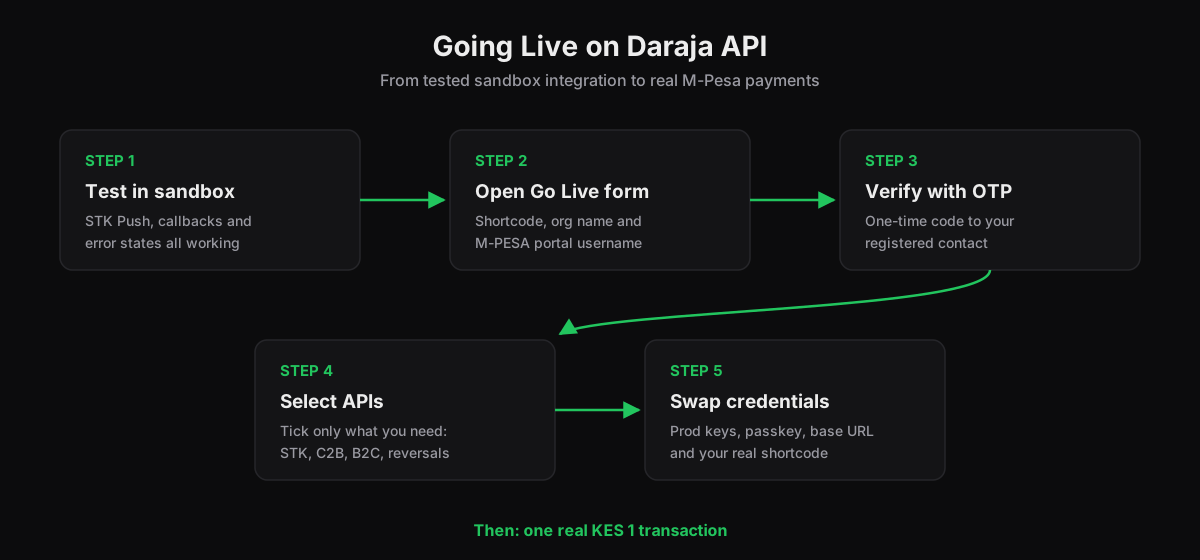
The Go Live form, step by step
The current Daraja portal makes go-live self-service. No request letters, no waiting on a portal inbox:
1. Open Go Live
Log in at developer.safaricom.co.ke and open Go Live from the sidebar.
2. Fill in your organization details
Set Verification Type to ShortCode, then enter your live shortcode, your organization name (exact match with the M-PESA Business Portal), and your M-PESA portal username.
3. Verify with the OTP
A one-time code goes to your registered contact. Enter it to prove the shortcode is yours.
4. Select the production APIs
Tick only what you actually need: STK Push, C2B, B2C, account balance, transaction status. Each selection becomes its own approval.
5. Collect your production credentials
On success, your production Consumer Key and Secret appear under My Apps. The production Passkey is emailed separately. Save both immediately.
The credential swap in your code
Everything environment-specific belongs in one config file. The swap looks like this:
| Setting | Sandbox | Production |
|---|---|---|
| Base URL | sandbox.safaricom.co.ke | api.safaricom.co.ke |
| Consumer Key/Secret | sandbox app | new production app |
| Passkey | sandbox passkey | emailed production passkey |
| Shortcode | 174379 or test shortcode | your live Paybill/Till |
| Security certificate | not required for STK | required for B2C and balance calls |
The most expensive bug in M-Pesa development is a sandbox shortcode leaking into production. Make it impossible:
if (process.env.NODE_ENV === 'production') {
  if (process.env.MPESA_SHORTCODE === '174379') {
    throw new Error('Sandbox shortcode in production, refusing to start');
  }
  if (process.env.MPESA_BASE_URL.includes('sandbox')) {
    throw new Error('Sandbox base URL in production, refusing to start');
  }
}
Two production quirks worth wiring in now:
- Tokens last about an hour (3599 seconds). Cache them for roughly 50 minutes instead of requesting one per transaction.
- Timestamps are East Africa Time, not UTC. A
Timestampbuilt from a UTC clock produces "Invalid Timestamp" errors that look like credential problems but are not.
Callback rules production actually enforces
Sandbox forgives sloppy callbacks. Production does not:
- HTTPS only, port 443, no redirects. A 301 to a pretty URL is a dead end; Safaricom does not follow it.
- Return 200 with valid JSON on every outcome, including failures. If your handler throws before responding, Safaricom treats the callback as failed and keeps resending.
- Bot protection must not block the sender. Allow the callback route through Cloudflare, firewall and rate limits.
- Be idempotent. Callbacks get replayed. A replayed success must not pay out twice:
app.post('/api/mpesa/callback', async (req, res) => {
  const event = req.body?.Body?.stkCallback;
  if (event) {
    // Keyed on CheckoutRequestID: a replay updates nothing
    await recordPaymentOnce(event);
  }
  res.status(200).json({ ResultCode: 0, ResultDesc: 'Accepted' });
});
The first hour with real money
Test with the smallest amount M-Pesa allows (KES 1) and walk every path before you tell anyone the system is live:
- Happy path: KES 1 succeeds, the callback lands, the order flips to paid exactly once.
- Customer cancels at the PIN prompt: expect
ResultCode 1032. The order stays unpaid and the customer sees a cancel message, not an error page. - Customer ignores the prompt: expect
ResultCode 1037. The order stays open and payable. - Replay a success callback: the order must not be paid twice.
- Watch the logs for 24 hours and alert on any callback that does not return 200.
When approval takes longer
Safaricom describes fast processing, but teams routinely plan for one to three working days, and longer runs happen. If your request sits pending, recheck the obvious first: organization name matching the M-PESA portal exactly, the correct verification type, and that you selected the APIs you meant to select. Approvals come per API, so one pending product does not block the others from moving.
Keep building
Going live is the finish line for integration one, not the end of the road. Payouts, reversals and reconciliation are the next layer:
The same sandbox code you tested now runs on production keys. From here, the work shifts to monitoring, idempotency and the flows above.
Ready to go live?
Need a second pair of eyes on callbacks, credential handling or first-transaction testing? Talk to our team before you flip the switch, or learn M-Pesa integration properly at Fortune Dev Academy. And keep the printable checklist next to your keyboard.